
Introduction
Google Ads and user intent go together because intent — not the keyword itself — is what Google’s ad auction increasingly rewards. If you’re bidding on words without knowing what the searcher actually wants to do next, you’re paying for clicks that were never going to convert.
Match the ad, the keyword, and the landing page to that intent, and cost per click drops while conversion rate climbs.
What Is User Intent in Google Ads?
User intent in Google Ads is the reason behind a search, not just the words used to type it. Someone typing “PPC agency Miami” wants to hire a company. Someone typing “what is PPC” wants a definition. Same topic, completely different intent — and completely different ad they should see.
Google’s ad-ranking system reads intent signals from the full query, not a single keyword. That’s why two searches with overlapping words can trigger very different ads, and why treating every match on a keyword the same way wastes spend on the wrong stage of the buying journey.
The 4 Types of Search Intent
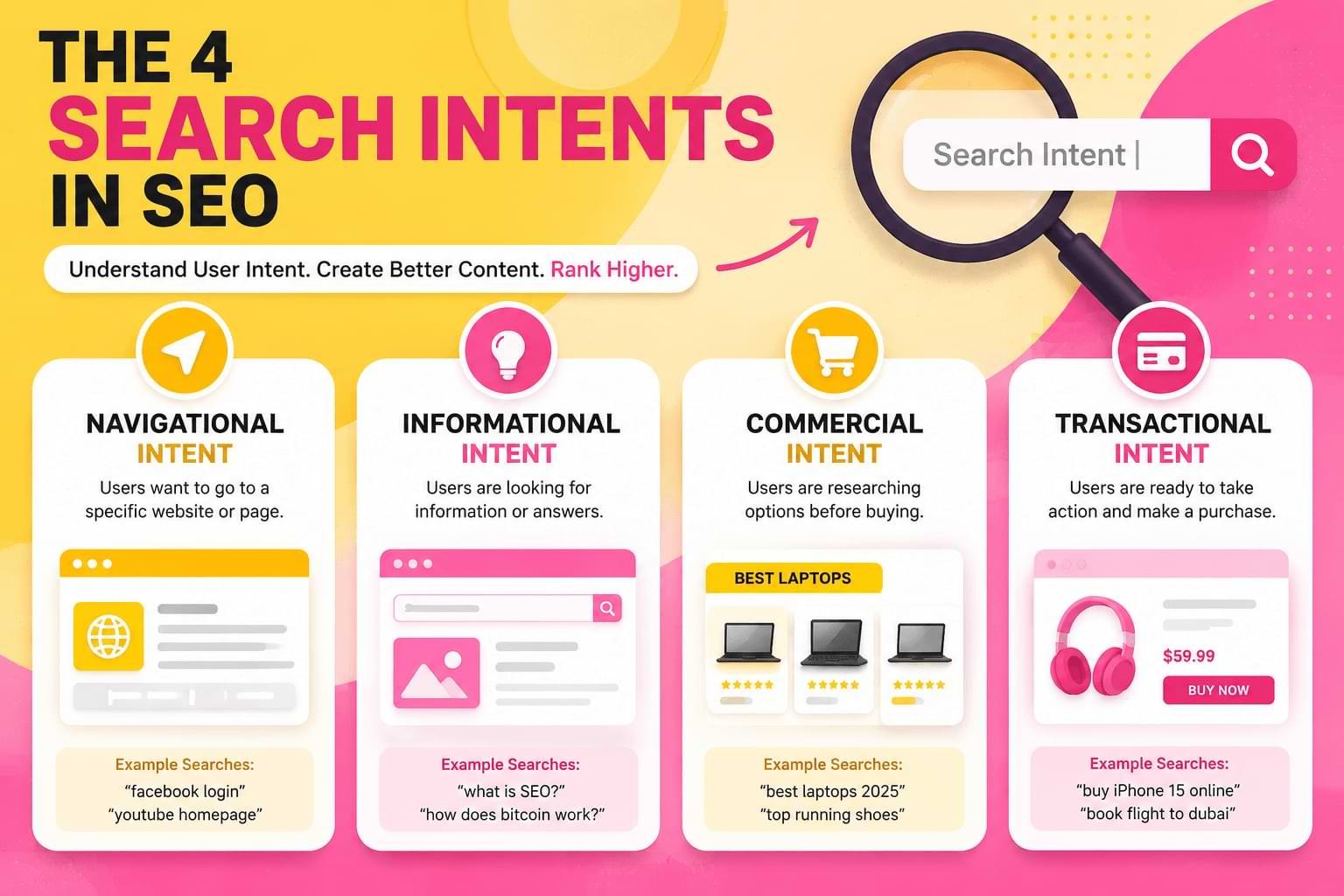
Every query a person types into Google falls into one of four buckets. Structuring ad groups around these buckets — instead of around loose keyword lists — is the single biggest lever in intent-based Google Ads management.
| Intent type | What the searcher wants | Example query | Ad approach |
|---|---|---|---|
| Informational | An answer or explanation | “how does Google Ads bidding work” | Educational copy, no hard CTA |
| Navigational | A specific site or brand | “Egochi Miami SEO Agency” | Brand-exact match, minimal spend |
| Commercial | Comparison before deciding | “best SEO agency Miami” | Feature and proof-focused copy |
| Transactional | Ready to act now | “hire SEO agency Miami” | Direct CTA, pricing or contact page |
Informational intent sits at the top of the funnel and rarely converts on the first click — its job is trust-building, not sales. Navigational intent is nearly pure brand defense; you’re paying to keep a competitor from sitting above your own listing.
Commercial intent is where comparison shoppers live, and it rewards ad copy that names a specific differentiator instead of a generic slogan. Transactional intent is where budget should concentrate, because the searcher has already decided to buy and only needs to pick who from.
Why Keyword-Only Bidding Leaves Money on the Table
A campaign built purely around keyword lists treats “SEO services” and “SEO services near me” as functionally identical. They aren’t. The second query carries local, near-transactional urgency; the first could be a student researching a term paper.
Keyword-only structures also make negative keyword management reactive instead of strategic — you find out a term was wasting spend only after the search terms report shows a month of irrelevant clicks.
Building ad groups around intent from the start means the negative keyword list gets written before the campaign launches, not after the invoice does.
A 5-Step Framework for Matching Campaigns to Intent
This is the process our team runs on every new Google Ads account, agency or client-owned.
- Pull the Search Terms Report for the account’s last 30–90 days and sort every query into one of the four intent buckets above.
- Split ad groups by intent, not by product category — informational queries and transactional queries should never share an ad group, even if they use the same core keyword.
- Write one headline per intent stage. Informational ad groups get a “learn” CTA; transactional ad groups get a direct offer or a phone number.
- Route each ad group to a matching landing page — never send a ready-to-buy click to a blog post, and never send an informational click straight to a checkout page.
- Re-audit monthly, because these signals shift with seasonality and with what competitors are bidding on.
Muhammad Rehan Iqbal, who leads content strategy and web development at Egochi, runs this same intent-mapping step before any new client site or ad account goes live — the audit doubles as both an SEO content gap check and a PPC ad group check, since the same query can inform both a blog post and an ad group simultaneously.
Match Types and Negative Keywords
Broad match, phrase match, and exact match still control eligibility, but Google’s automated bidding leans more heavily on these signals inside broad match than it used to. That makes negative keywords the actual precision tool now, not match type alone.
Add negative keywords the moment a search term report shows queries with the wrong motivation triggering your ad — a transactional ad group getting hit by “free,” “DIY,” or “how to” queries is a signal to exclude those terms, not to lower the bid and hope.
Quality Score, CPC, and Intent Alignment
Quality Score is Google’s estimate of how relevant your ad, keyword, and landing page are to the searcher. Expected click-through rate is the heaviest input into that score, and expected CTR rises sharply when the ad copy mirrors exactly what the searcher is trying to do.
A higher Quality Score lowers cost per click and improves ad position at the same bid — which is the real mechanism behind “intent-based ads perform better.” It isn’t magic; it’s Google discounting ads it predicts people will actually click.
Ad Copy and Landing Pages by Intent Stage
Informational vs. transactional is the split that matters most in practice:
- Informational ad copy answers the question in the headline and links to a guide, not a sales page. Bounce rate on this traffic will always run higher — that’s expected, not a failure.
- Transactional ad copy names the offer, states a next step (“Get a Free Audit”), and links directly to a contact or pricing page. Any friction here — a slow page, a buried phone number — burns Quality Score along with the click.
Commercial-intent visitors need a middle ground: enough proof (case studies, comparisons) to move them toward the transactional page without the hard sell an informational visitor would bounce from.
Google Ads and AI Overviews: Why Intent Matters More Now

Search behavior has shifted since AI Overviews and AI Mode started answering informational queries directly inside the results page, before a user ever reaches an ad.
Google’s own Search Console added Generative AI performance reporting in 2026 specifically so advertisers and site owners could see how often their pages surface inside those AI-generated answers, separate from traditional organic clicks.
Practically, this means informational keywords are worth less as a paid-click target than they were two years ago — some of that traffic gets answered by the AI Overview and never clicks through at all — while transactional and commercial queries, which AI Overviews rarely fully resolve, hold their value.
Shifting budget away from broad informational terms and toward those higher-value stages is now a defensive move, not just an efficiency one. (Google’s own Search Ads guidance on quality and relevance is documented at Google Ads Help; it’s worth reviewing before any major bid-strategy change.)
How Much Does Google Ads Pay Per 1,000 Views?
This is a different question than everything above, and it’s worth answering directly instead of dodging it: Google Ads is the platform advertisers pay to run ads on — it doesn’t pay anyone.
The product that pays website owners per thousand views is Google AdSense, using a CPM (cost per mille) or RPM (revenue per mille) model that varies by niche, traffic quality, and ad placement, typically landing anywhere from under a dollar to several dollars per 1,000 views depending on the site’s content category and audience location.
If your goal is running ads and buying traffic, you’re in the right place — keep reading. If your goal is earning money from ads on your own site, you want AdSense resources, not a Google Ads campaign guide.
The 8 Types of Google Ads Campaigns
Google Ads currently organizes campaigns into eight core types, and matching the right type to the right buying stage is as important as the ad copy inside it.
Most small and mid-sized advertisers only ever run two or three of these — usually Search plus one of Performance Max or Display — which is fine, as long as the choice is deliberate rather than a default left over from account setup.
- Search campaigns — text ads on Google’s search results, best for commercial and transactional queries.
- Display campaigns — visual ads across the Google Display Network, better suited to awareness-stage searches.
- Shopping campaigns — product listings pulled from a merchant feed, built for transactional, product-ready searches.
- Video campaigns — ads on YouTube and video partners, typically tied to informational or brand-awareness goals.
- App campaigns — ads promoting app installs or in-app actions across Google’s properties.
- Performance Max campaigns — a goal-based campaign type that runs across all Google inventory from one setup.
- Local campaigns — ads designed to drive foot traffic to physical store locations.
- Demand Gen campaigns — visually rich ads across YouTube, Discover, and Gmail, aimed at mid-funnel commercial searches.
Google Ads vs. SEO: Where the Two Overlap
Google Ads and organic SEO are often managed as separate budgets, but they answer to the same underlying signal. The same query that tells a PPC manager which ad group to build also tells an SEO writer which page to create — a “how to” query needs a guide either way, whether it’s reached through a paid click or an organic ranking.
Egochi runs both disciplines through the same audit step for exactly this reason. Pulling a client’s search terms report doesn’t just refine ad groups; it surfaces content gaps for the blog and service pages too, so a single research pass feeds two channels instead of one.
Agencies that keep SEO and PPC in separate silos usually end up building near-duplicate keyword research twice, once for each team, which wastes hours a shared audit would save.
Where the two diverge is speed and risk. A paid campaign can test a new angle in days and get discarded if it underperforms; organic content takes months to rank and is expensive to walk back. That makes paid campaigns the faster proving ground for which angle actually converts before committing the heavier SEO investment to it.
A Quick Note on AdMob, Unity, and Kotlin Integration Searches

A few related searches point toward app development rather than ad-campaign strategy — things like integrating Google Ads or AdMob into a Unity project, wiring up ad requests in Kotlin for an Android app, or setting up a Google AdMob SDK inside a mobile build.
That’s a developer question, not a marketing one, and it belongs in Google’s AdMob and Google Ads API developer documentation rather than in a campaign-strategy guide like this one — which is itself a small example of the intent-matching principle this whole article is about: send the reader to the resource that actually matches what they typed.
Common Mistakes When Structuring Campaigns This Way
A few patterns show up repeatedly when we take over an account that was previously managed on keyword lists alone:
- Mixing buying stages inside one ad group. A group built around “SEO services” that includes both “what is SEO” and “hire SEO company” queries forces one generic ad to try to serve two completely different searchers, and it satisfies neither.
- Treating every click as equally valuable. Reporting that only tracks total clicks, without segmenting by stage, hides the fact that a chunk of the budget is going toward traffic that was never going to convert this month.
- Never revisiting the negative keyword list. Search behavior shifts with seasonality, competitor bidding, and new product launches; a list built once and left alone slowly drifts out of date.
- Sending every click to the homepage. A dedicated landing page per campaign type costs a fraction of what the wasted spend from a mismatched page does over a quarter.
Fixing these four issues alone, before touching bids or budgets, is usually where the first visible improvement in cost per conversion comes from.
FAQs
What is intent in Google Ads?
Intent in Google Ads is the underlying goal behind a search query — informational, navigational, commercial, or transactional — that Google’s system uses to decide which ads are relevant enough to show.
What are the 4 types of search intent?
Informational, navigational, commercial, and transactional. Each corresponds to a different stage of the buying journey and should map to a different ad group, ad copy angle, and landing page.
How much does Google Ads pay per 1,000 views?
Google Ads doesn’t pay anyone — it’s the platform advertisers pay to run ads on. AdSense is the Google product that pays site owners per 1,000 views, and rates vary widely by niche and traffic quality.
What are the 8 types of Google Ads?
Search, Display, Shopping, Video, App, Performance Max, Local, and Demand Gen campaigns — each built for a different intent stage or ad placement.
Do negative keywords actually improve ROI, or just cut volume?
Both. Cutting irrelevant traffic reduces wasted spend directly, and it also raises expected CTR on the traffic that remains, which improves Quality Score and lowers CPC on every future click.
How long does it take to see results after restructuring campaigns by intent?
Most accounts show a shift in search-term quality within the first two to three weeks, since that’s roughly one full reporting cycle of the search terms report; Quality Score and CPC improvements typically follow over 4–8 weeks as Google’s system re-learns the account’s new structure.
Can Google Ads and SEO share the same keyword research?
Yes, and they usually should. The same search terms report or keyword list that shapes ad groups also points to content gaps on the organic side, so one research pass can inform both a paid campaign and a blog or service page instead of duplicating the work twice.
Conclusion
A few of the terms tied to this topic point to Google’s publisher-side ad product (AdSense) rather than the advertiser-side Google Ads strategy covered above. Listed here for completeness, with a note on where each actually belongs:
- Ad intent reviews, ad intent anchor, Adsense display ads ad intents, ad intent Shopify, boost your revenue with ad intents — these describe AdSense’s “Ad Intents” feature (interstitial and anchor ad units for publishers), not Google Ads campaign targeting.
- Ads settings, how to turn off auto ads, vignette ads — publisher-side AdSense controls for managing automatically inserted ad units on a site, again separate from running a Google Ads campaign.
Related developer-intent searches: google ads integration unity, google ads app integration, google ads in kotlin, google AdMob ads integration, google ads AdMob android, google smart ads example, google ads custom segment, google ads is used by — covered in the disambiguation note above.