WHAT YOU’LL LEARN
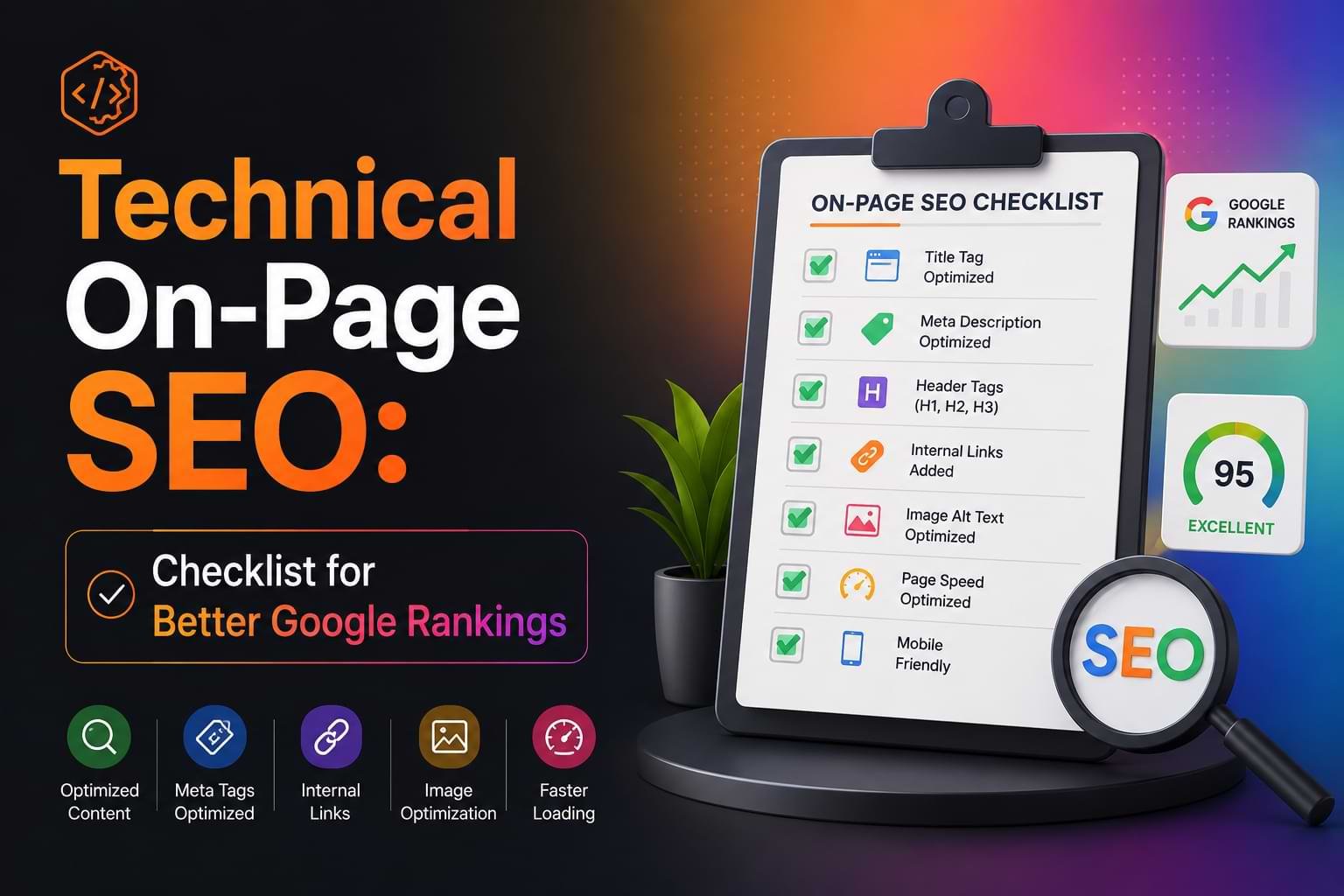
- How to optimize HTML elements like title tags, meta descriptions, and header structures to signal relevance to search engines
- Which technical on-page factors directly impact your search engine rankings and how to fix them
- Practical tools and methods to audit your pages and identify technical issues blocking your content from ranking
- The difference between technical on-page SEO and other SEO types so you know exactly where to focus your efforts
- Step-by-step fixes for common problems that content creators face when optimizing pages for search visibility
What Is Technical On-Page SEO and Why Does It Matter?
Technical On-Page SEO is the practice of optimizing the code, structure, and technical elements within your web pages to help search engines crawl, understand, and rank your content more effectively.
Unlike off-page SEO (which focuses on backlinks and external signals) or content SEO (which focuses on what you write), technical on-page SEO deals with how your page is built. This includes HTML markup, structured data, page speed optimization, mobile responsiveness, and the technical implementation of elements like title tags and meta descriptions.
Search engines rely on technical signals to determine what your content is about and whether it deserves to rank. When you publish a well-written article but ignore technical on-page factors, you’re essentially speaking to Google in a language it can’t fully understand. Your content might be excellent, but poor technical implementation means search engines struggle to index it properly, extract meaning from it, or determine its relevance to user queries.
This matters because technical on-page SEO directly influences your search engine rankings. Google’s crawlers evaluate hundreds of technical signals when deciding which pages to show for any given search. If your competitor’s page has better technical optimization than yours—even with similar content quality—they’ll likely outrank you.
For content creators specifically, mastering technical on-page SEO means your great content actually gets discovered. You control these elements directly on your own pages, making this one of the most actionable areas of search engine optimization.
This guide is for content creators, bloggers, digital marketers, and website owners who want to understand and implement technical on-page SEO without needing a developer for every change.
How Does Technical On-Page SEO Differ from Other SEO Types?
Technical on-page SEO focuses specifically on the code-level and structural optimizations you make within individual pages, while other SEO types address different aspects of search visibility.
Understanding these distinctions helps you allocate your optimization efforts correctly and avoid confusion about where to focus.
Technical On-Page vs. Content SEO
Content SEO involves the words you write, the topics you cover, and how well you match user intent. Technical on-page SEO is how you mark up that content for search engines.
For example, writing a comprehensive 2,000-word guide is content SEO. Placing your target keyword in an H1 tag, adding schema markup, and optimizing your title tag is technical on-page SEO.
Both are essential. Great content with poor technical implementation underperforms. Perfect technical setup with thin content also fails.
Technical On-Page vs. Technical SEO (Site-Wide)
Technical SEO refers to site-wide infrastructure issues like XML sitemaps, robots.txt files, server response codes, site architecture, and crawl budget optimization. These affect your entire website.
Technical on-page SEO deals with individual page optimization: the HTML elements, structured data, and technical factors specific to each URL you publish.
Think of technical SEO as building a solid foundation for your house, while technical on-page SEO is optimizing each individual room.
Technical On-Page vs. Off-Page SEO
Off-page SEO involves external signals like backlinks, brand mentions, social signals, and domain authority. You’re building credibility from outside sources.
Technical on-page SEO is entirely within your control on your own pages. You don’t need anyone else’s permission or participation to implement these optimizations.
For content creators with limited budgets or connections, technical on-page SEO offers immediate, controllable improvements to search engine rankings.
What Are the Core Technical On-Page SEO Elements?
The core technical on-page SEO elements are HTML tags (title, meta, headers), structured data markup, internal linking structure, URL structure, image optimization, and page rendering performance.
These elements work together to communicate your page’s topic, structure, and value to search engines. Each serves a specific purpose in helping crawlers understand and rank your content.
HTML Title Tags
Your title tag is the single most important on-page ranking signal. It appears in search results as the clickable headline and tells both users and search engines what your page is about.
Title tags should contain your primary focus keyword near the beginning, stay between 50-60 characters, and accurately describe the page content. Generic titles like “Home” or “Blog Post” waste this critical ranking opportunity.
Meta Descriptions
Meta descriptions don’t directly impact rankings but significantly affect click-through rates from search results. Search engines often display this text as the snippet below your title.
Write meta descriptions between 150-160 characters that answer the user’s query and include a natural reason to click. Treat this as ad copy for your organic listing.
Header Tag Hierarchy (H1-H6)
Header tags structure your content hierarchically. Your H1 should contain your focus keyword and clearly state your page topic. H2s break content into major sections. H3s create subsections within H2s.
This hierarchy helps search engines understand content organization and extract featured snippet candidates from well-structured sections.
Structured Data (Schema Markup)
Structured data provides explicit context about your content using standardized vocabulary. Adding Article schema tells search engines this is editorial content. FAQ schema marks up question-answer pairs. HowTo schema identifies step-by-step instructions.
Pages with relevant structured data are more likely to appear in rich results, AI Overviews, and voice search answers. This markup translates your content into a format AI systems can confidently cite.
Internal Links with Descriptive Anchor Text
Internal links distribute ranking power across your site and help search engines discover related content. The anchor text (clickable words) provides context about the linked page’s topic.
Instead of “click here” or “read more,” use descriptive phrases like “learn about keyword research” or “see our technical SEO audit process.” This reinforces topical relationships between pages.
URL Structure
Clean, descriptive URLs perform better than auto-generated strings of numbers or parameters. Use lowercase letters, hyphens to separate words, and include your primary keyword where natural.
Good: /technical-on-page-seo-guide
Bad: /page?id=12345&category=seo
Search engines and users both prefer readable URLs that indicate page content.
Image Optimization
Every image needs descriptive alt text that explains what the image shows. This helps search engines understand visual content and makes your pages accessible to screen readers.
File names also matter. Name images descriptively (technical-seo-checklist.png) rather than generically (IMG_001.png). Compress images to reduce file size without sacrificing visual quality.
Mobile Responsiveness
Google uses mobile-first indexing, meaning it primarily evaluates the mobile version of your page for ranking purposes. Your content must be fully accessible and readable on small screens.
Responsive design that adapts to different screen sizes is now a baseline requirement, not an optional enhancement.
How Do You Optimize HTML Tags for Better Rankings?

Optimize HTML tags by placing your focus keyword strategically in title tags, using one H1 per page with your primary keyword, and structuring H2-H6 tags in logical hierarchy to outline your content.
HTML tags are the most direct way to communicate topical relevance to search engines. Proper optimization follows specific patterns proven to improve search engine rankings.
Title Tag Optimization
Start your title tag with your focus keyword when possible. Front-loading signals priority to search engines scanning the tag.
Include your brand name at the end if space allows, separated by a pipe or dash: Technical On-Page SEO: Complete Guide | YourBrand
Avoid stuffing multiple keywords into the title. One primary keyword phrase with natural modifiers works better than cramming unrelated terms.
Test your title length using a SERP preview tool. Google typically displays the first 50-60 characters. Longer titles get truncated with “…” which loses click appeal.
H1 Optimization
Use exactly one H1 tag per page containing your exact focus keyword. This tag should match or closely align with your title tag and page topic.
The H1 doesn’t need to be identical to your title tag, but both should clearly indicate the same topic. For a page about technical on-page SEO, your H1 should explicitly say “Technical On-Page SEO” rather than using a creative variation that omits the keyword.
Place your H1 at the top of your content where users and crawlers immediately see it.
H2-H6 Hierarchy Best Practices
Structure your headers in descending order without skipping levels. H2s follow your H1, H3s nest under H2s, and so on.
Wrong hierarchy:
H1 → H3 → H2 (skips H2 before using H3)
Correct hierarchy:
H1 → H2 → H3 → H3 → H2 → H3
Use question-based H2 headings where they match real user searches. “What is technical on-page SEO?” performs better than “Definition” because it matches how people actually search and how AI systems extract answers.
Include keyword variations and related terms in your H2 and H3 tags naturally. If your focus keyword is “technical on-page SEO,” related H2s might include “HTML optimization,” “page speed factors,” or “search engine rankings.”
Meta Description Optimization
Write unique meta descriptions for every important page. Don’t duplicate the same description across multiple URLs.
Front-load the benefit or answer to the user’s query. “Master technical on-page SEO to boost rankings” immediately tells searchers what they’ll gain.
Include your focus keyword naturally, but prioritize readability and click appeal over keyword insertion. Search engines bold query-matching terms in the displayed snippet, making your result more visible.
Add a soft call-to-action that creates urgency or curiosity: “Learn the tactics content creators use to rank higher” or “Discover the technical fixes that improve search visibility.”
Canonical Tags
Use canonical tags to specify the preferred version of a page when duplicate or similar content exists. This prevents search engines from splitting ranking signals across multiple URLs showing the same content.
Self-referencing canonical tags (pointing to themselves) are best practice even when no duplicates exist. This explicitly tells search engines which version to index if parameters or tracking codes create URL variations.
What Role Does Page Speed Play in Search Engine Rankings?
Page speed is a direct ranking factor in Google’s algorithm and significantly impacts user experience metrics that indirectly affect rankings through engagement signals.
Google confirmed page speed as a ranking factor in 2018 for desktop search and 2021 for mobile search through the Page Experience update. Faster pages have a measurable advantage in search engine rankings, all else being equal.
Core Web Vitals
Google measures page speed through Core Web Vitals, three specific metrics that quantify loading performance, interactivity, and visual stability:
Largest Contentful Paint (LCP) measures how long the largest visible element takes to load. Target under 2.5 seconds. This represents actual perceived loading speed for users.
First Input Delay (FID) or Interaction to Next Paint (INP) measures how quickly your page responds to user interactions. Target under 100 milliseconds for FID or under 200 milliseconds for INP.
Cumulative Layout Shift (CLS) measures visual stability—how much elements unexpectedly move during page load. Target under 0.1. Late-loading ads or images without defined dimensions cause poor CLS scores.
Pages meeting these thresholds for 75% of user visits pass Core Web Vitals assessment. Pages failing these metrics may experience ranking penalties, particularly in competitive search spaces.
Technical Factors Affecting Page Speed
Several technical on-page elements directly control page speed:
Image optimization is usually the fastest improvement opportunity. Compress images, use modern formats like WebP, implement lazy loading for below-fold images, and specify explicit width and height attributes.
Minimize render-blocking resources like CSS and JavaScript files that prevent page content from displaying. Use async or defer attributes for non-critical scripts.
Enable browser caching so repeat visitors don’t re-download unchanged resources.
Reduce server response time through better hosting, content delivery networks (CDNs), and optimized database queries.
Minimize HTTP requests by consolidating CSS and JavaScript files and using CSS sprites for multiple small images.
For content creators working on platforms like WordPress, speed optimization plugins can automate many of these technical implementations without manual coding.
Why Speed Affects Rankings Beyond the Direct Factor
Even beyond Google’s explicit speed ranking factor, faster pages generate better engagement metrics that indirectly boost rankings.
Slow pages have higher bounce rates. Users who immediately leave send negative signals to search engines about content quality or relevance.
Fast pages generate longer dwell time and more page views per session. These engagement patterns signal valuable content worth ranking higher.
Mobile users especially abandon slow pages. With mobile-first indexing, your mobile page speed directly determines how Google evaluates your content.
How Do You Fix Common Technical On-Page SEO Issues?
Fix common technical on-page SEO issues by identifying them through audits, then systematically addressing duplicate content, missing meta tags, broken internal links, unoptimized images, and poor mobile usability.
Most technical on-page problems follow predictable patterns with straightforward solutions. Knowing what to look for speeds up the optimization process.
Duplicate or Missing Title Tags and Meta Descriptions
Problem: Multiple pages share the same title tag, or pages lack meta descriptions entirely.
Fix: Write unique titles and descriptions for every important page. Use templates for scale on large sites (product pages, category pages) but customize the variable elements: [Product Name] - [Category] | Brand Name
Prioritize high-traffic and high-conversion pages first if you have thousands of URLs.
Missing or Multiple H1 Tags
Problem: Pages have no H1, multiple H1s, or H1 tags that don’t contain the focus keyword.
Fix: Add exactly one H1 per page containing your primary keyword. Most content management systems let you set this separately from your title tag.
Check your theme or template settings. Some themes automatically generate H1s from page titles, while others require manual entry.
Broken Internal Links
Problem: Links pointing to pages that return 404 errors or redirect chains that pass through multiple URLs before reaching the destination.
Fix: Update links to point directly to active, final destination URLs. Remove links to deleted content or replace them with relevant alternatives.
Use a crawler tool to identify broken links across your site, then fix them in batches.
Images Without Alt Text or Oversized Files
Problem: Images missing alt attributes, or image files that are multiple megabytes causing slow load times.
Fix: Add descriptive alt text to every image explaining what the image shows. Use your keyword naturally when relevant, but prioritize accurate description.
Compress images before uploading using tools like TinyPNG, Squoosh, or ImageOptim. Aim for under 100KB per image for web use.
Convert to modern formats like WebP that offer better compression than JPEG or PNG.
Non-Responsive Mobile Design
Problem: Content gets cut off, buttons are too small to tap, or text is unreadable on mobile devices.
Fix: Implement responsive design using CSS media queries or a mobile-responsive theme. Most modern website platforms include responsive options by default.
Test pages using Google’s Mobile-Friendly Test tool and fix flagged issues.
Ensure tap targets (buttons, links) are at least 48×48 pixels with adequate spacing. Make text at least 16px base size without requiring zoom.
Missing Structured Data
Problem: Pages lack schema markup that would qualify for rich results or AI Overview citations.
Fix: Implement relevant structured data types based on your content. Article schema for blog posts, FAQ schema for question-answer content, HowTo schema for instructional guides.
Use Google’s Rich Results Test to validate your markup and preview how it appears to search engines.
JSON-LD format is Google’s recommended implementation method. It’s easier to add and maintain than inline microdata.
Slow Page Speed
Problem: Pages take more than 3 seconds to load or fail Core Web Vitals thresholds.
Fix: Start with image optimization, which usually offers the largest quick wins. Then address render-blocking resources, enable caching, and consider a CDN for static assets.
Test with Google PageSpeed Insights to identify specific issues affecting your pages. The tool provides prioritized recommendations with impact estimates.
For WordPress users, plugins like WP Rocket, LiteSpeed Cache, or Perfmatters automate many speed optimizations without requiring manual code changes.
What Tools Help You Audit Technical On-Page SEO?
Tools that help you audit technical on-page SEO include Google Search Console for official Google data, Screaming Frog for comprehensive crawling, and PageSpeed Insights for performance metrics.
Using the right tools reveals issues you’d never find through manual inspection and provides data to prioritize your optimization efforts.
Google Search Console
Google Search Console is the essential free tool for technical on-page SEO because it shows you exactly how Google sees your pages.
The Coverage report identifies indexing issues, errors, and warnings affecting your pages. The Page Experience report shows which URLs pass or fail Core Web Vitals thresholds.
The Enhancements section flags problems with structured data, mobile usability, and other technical factors.
Check Search Console weekly to catch technical issues before they significantly impact traffic.
Screaming Frog SEO Spider
Screaming Frog crawls your entire site like a search engine, identifying technical issues across all pages simultaneously.
It reveals missing title tags, duplicate meta descriptions, broken links, redirect chains, oversized images, and header tag problems in sortable reports.
The free version crawls up to 500 URLs. Paid versions handle unlimited URLs and add advanced features like JavaScript rendering and custom extraction.
Run a full site crawl monthly to catch technical issues introduced by updates, new content, or template changes.
Google PageSpeed Insights
PageSpeed Insights analyzes individual page loading performance and provides specific recommendations for improvement.
It shows real user data from the Chrome User Experience Report (when available) alongside lab data from simulated testing.
The tool categorizes issues by impact level, helping you focus on changes that deliver the largest speed improvements.
Test your most important pages quarterly or after making significant design or functionality changes.
Ahrefs Site Audit
Ahrefs Site Audit combines crawling with proprietary data to identify technical SEO issues and their potential traffic impact.
It scores your site’s overall health, flags critical errors, and provides actionable recommendations with priority levels.
The tool monitors changes over time, helping you track whether your technical optimization efforts are improving your site’s technical health score.
SEMrush Site Audit
SEMrush Site Audit offers similar functionality to Ahrefs with particularly strong reporting for duplicate content, crawlability issues, and international SEO problems.
It integrates with other SEMrush tools to show how technical issues correlate with ranking performance for your tracked keywords.
Scheduled automated audits alert you to new technical problems as soon as they appear.
Manual Testing Tools
Several free Google tools supplement automated audits:
Mobile-Friendly Test checks whether a specific page works well on mobile devices.
Rich Results Test validates structured data markup and previews how pages might appear in rich results.
Lighthouse (built into Chrome DevTools) audits performance, accessibility, SEO, and best practices with detailed scoring and recommendations.
Run manual tests when launching new content types or templates to verify technical optimization before publishing at scale.
How Do You Measure Technical On-Page SEO Success?
Measure technical on-page SEO success by tracking improvements in search engine rankings for target keywords, organic traffic increases, Core Web Vitals metrics, and indexation rates in Google Search Console.
Effective measurement connects technical changes to actual search performance outcomes rather than just checking off optimization tasks.
Keyword Ranking Improvements
Track rankings for your primary focus keywords before and after implementing technical on-page optimizations.
Use rank tracking tools like Ahrefs, SEMrush, or Google Search Console’s Performance report to monitor position changes over time.
Focus on keywords where you rank on page 2 (positions 11-20) since technical improvements often push these pages onto page 1 where they generate significantly more traffic.
Expect to see ranking impacts within 2-6 weeks after making technical changes as search engines recrawl and re-evaluate your optimized pages.
Organic Traffic Growth
Monitor organic traffic to specific pages or page groups where you’ve implemented technical optimizations.
Google Analytics or your analytics platform should show increased sessions from organic search if your technical improvements help pages rank better and generate higher click-through rates.
Segment traffic by device type to verify that mobile usability improvements drive mobile traffic increases.
Compare traffic from the 30 days before optimization to 30-60 days after to account for normal fluctuations.
Core Web Vitals Metrics
Track Core Web Vitals improvements in Google Search Console’s Page Experience report.
The report shows the percentage of URLs passing assessment for LCP, FID/INP, and CLS, broken down by mobile and desktop.
Watch for increases in “Good” URL percentages after implementing page speed optimizations.
These metrics update based on real user data collected over rolling 28-day periods, so changes appear gradually rather than immediately.
Indexation and Coverage
Monitor the number of indexed pages and coverage issues in Google Search Console.
Successful technical optimization should reduce errors and warnings in the Coverage report while maintaining or increasing the number of valid indexed pages.
Watch for specific improvements in previously flagged issues like “Crawled – currently not indexed” or “Discovered – currently not indexed” as you fix technical barriers to indexation.
Click-Through Rate from Search Results
Improved title tags and meta descriptions should increase click-through rates from search results.
Google Search Console’s Performance report shows CTR by query and by page. Compare CTR before and after meta tag optimization.
Higher CTR from the same average ranking position indicates more compelling search result presentation through better technical optimization.
Structured Data Rich Result Appearances
If you’ve added structured data, monitor appearances in rich results using the Enhancements report in Google Search Console.
Track increases in FAQ rich result impressions, How-to result appearances, or other enhanced result types relevant to your schema markup.
Pages appearing in rich results typically generate higher CTR even at lower average positions.
Time-Based Analysis
Technical on-page SEO improvements compound over time as search engines recrawl your content and user engagement signals accumulate.
Measure success in 30-day, 90-day, and 180-day windows after implementation rather than expecting immediate dramatic changes.
Document your technical optimization timeline so you can correlate specific changes with performance shifts in your analytics.
FAQ
Q: How long does it take for technical on-page SEO changes to affect rankings?
Most technical on-page SEO changes impact rankings within 2-6 weeks after search engines recrawl your updated pages. Critical fixes like improving page speed or fixing indexation issues can show results faster, while competitive keywords may take longer to reflect optimization improvements. The timeline depends on your site’s crawl frequency and how significant the technical issues were.
Q: Can I do technical on-page SEO without coding knowledge?
Yes, content creators can implement most technical on-page SEO using content management systems like WordPress without writing code. Modern CMS platforms and SEO plugins let you edit title tags, meta descriptions, header tags, alt text, and add structured data through user-friendly interfaces. Page speed optimization may require plugin installation but rarely needs manual coding.
Q: What’s the difference between technical SEO and technical on-page SEO?
Technical SEO addresses site-wide infrastructure issues like XML sitemaps, robots.txt, site architecture, and server configuration affecting your entire website. Technical on-page SEO focuses on optimizing individual page elements like HTML tags, structured data, image optimization, and page-specific performance factors. Both are important, but technical on-page SEO is more directly controllable by content creators.
Q: Does technical on-page SEO matter more than content quality?
No, technical on-page SEO and content quality work together—neither alone guarantees rankings. Excellent content with poor technical implementation underperforms because search engines struggle to understand and index it properly. Perfect technical optimization with thin content also fails because you’re not actually answering user queries. Focus on both for maximum search engine rankings.
Q: How often should I audit my technical on-page SEO?
Audit your technical on-page SEO monthly for active content sites, quarterly for stable sites with infrequent updates. Run spot checks whenever you change themes, add new functionality, or publish important content. Google Search Console should be monitored weekly to catch critical issues quickly. Regular auditing helps you identify problems before they significantly impact search visibility.
Q: Is page speed more important on mobile or desktop?
Page speed is more important on mobile because Google uses mobile-first indexing, evaluating primarily the mobile version of your pages for ranking. Mobile users also have less patience for slow-loading pages and more frequently browse on slower connections. Optimize for mobile page speed first, though desktop performance still matters for user experience and conversions.
Q: What’s the most important technical on-page SEO factor?
The title tag is the single most important technical on-page SEO factor because it’s the strongest individual relevance signal and directly affects both rankings and click-through rates. A well-optimized title tag containing your focus keyword near the beginning accurately describes your content and attracts clicks from search results. Fix title tags before any other technical element if you’re prioritizing limited time.
Q: Do I need structured data on every page?
Not every page needs structured data, but adding relevant schema markup where appropriate improves your chances of appearing in rich results and AI Overviews. Focus structured data efforts on your most important content types—articles, FAQs, how-to guides, products, or services. Generic pages like privacy policies or contact forms rarely benefit from structured data.
Q: Can technical on-page SEO compensate for bad backlinks?
No, technical on-page SEO cannot fully compensate for harmful backlinks or lack of quality backlinks. While strong technical optimization helps you compete effectively, backlinks remain a separate major ranking factor in Google’s algorithm. Technical excellence positions your content to rank well when combined with adequate backlink authority, but it doesn’t replace the need for credible external signals.
Q: Should I optimize every page or focus on high-traffic pages first?
Focus technical on-page SEO efforts on high-traffic pages and conversion-focused pages first for the fastest impact. These optimizations deliver immediate returns by improving pages that already drive business value. After optimizing priority pages, expand to pages ranking on page 2 (positions 11-20) since technical improvements often push them to page 1 where traffic increases significantly.
Conclusion
Technical on-page SEO gives content creators direct control over how search engines understand, evaluate, and rank their pages. By optimizing HTML elements like title tags and headers, improving page speed, adding structured data, and fixing common technical issues, you signal relevance to search engines while creating better experiences for human readers.
The most important takeaways: Use your focus keyword strategically in title tags and H1 headers. Structure your content with clear header hierarchy that helps both users and AI systems extract information. Monitor Core Web Vitals and fix page speed issues that hurt rankings and user experience. Audit your technical on-page SEO regularly to catch issues before they impact traffic.
Technical on-page optimization compounds over time. Pages you optimize today continue delivering better rankings and traffic for months and years ahead. Unlike content that may need updating or backlinks that can fade, technical improvements create lasting foundations for search visibility.